Login to Lunar Client
Reporting Ads on Lunar Client
Lunar Client is designed to enhance the Minecraft experience, offering players a wide range of features to explore and enjoy.
Lunar Client enhances the Minecraft experience, offering players a wide range of features to explore and enjoy. When it comes to advertisements on our client, we want to ensure problematic ads aren’t shown to our audience; however, some can slip through the filter.
Ads On The Lunar Client Launcher
Advertisements on Lunar Client are shown in the bottom-right corner of the Launcher. These advertisements are based on your ‘cookies’ and similar technologies used to personalize ads based on your interests. Sometimes, small cracks may appear, and a few bad apples may be shown to our players.
How We Sift Through Advertisements
We work with Overwolf and GeoEdge to ensure our users don't see these explicit advertisements. We use GeoEdge’s services to prevent malicious advertisements from compromising the user experience, so when a report is sent to our team, we can assess the situation easily.
What is Malvertising
Malvertising is a common term used by cyberhackers to inject malware into users’ computers when they click on an online advertisement or visit a malicious website. Advertisements that encourage users to click on a pop-up ad are considered malicious. The following are some examples of this:
Fake Software Updates
Advertisements that inform users to “Update” their software using fearmongering tactics.
PC Infection Alert
Informing users that their computer is infected and to ‘click’ on the pop-up to clean their PC.
Prize Scams
Statements like “You’ve won a free iPhone” are used to lure unsuspecting users to the site.
Impersonating Brands
Utilizing company branding to lure users into clicking the pop-up.
⚠️ We will never ask you for your email or password. We encourage you to not share them with anyone.
Preventing Problematic Ads
Advertisements will display three dots (...) on the top-right corner of the advertisement window. You can click on that icon and select “Stop Seeing this Ad” from Google. This will prevent you from seeing similar advertisements if you’re not interested. However, if you see a troubling post that you and other players may not want to see in the future, you can report it straight to GeoEdge.
By navigating down to the ⚠️ icon, located at the bottom left, you can report the advertisement from our Launcher. This will send a report straight to GeoEdge for review, helping prevent these ads from showing up for you and other users.
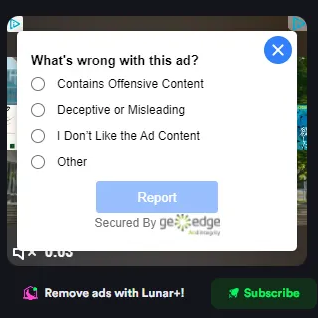
If you’re still seeing repeated or similar ads despite reporting them, you can submit a support ticket to Lunar Client’s Support Team through our website.
Categories We Block
To protect our users from these explicit advertisements, we block the following types of ads. However, if you see these types of ads get shown on your Launcher, be sure to report them:
Malware
NSFW Content
Cryptocurrency scams
Offensive or dangerous content
Auto-redirects
Fake antivirus alerts
If you have any questions or are experiencing issues with your client, create a ticket on our Support Website or join the Lunar Client Discord server! If you are unsure of how to create a ticket, please view the Lunar Client Support Guide.
More in General
How to Create a Lunar Client Profile
Spotting a Malicious Site
Over the past few years there has been a large rise in attempts to obtain accounts through the use of lookalike sites with the assistance…
Changing Launcher Stream
Only perform these steps when instructed by a Lunar Client staff member
Uploading Launcher Logs
Learn how to upload your Lunar Client launcher logs when requested by a Lunar Client staff member. Follow these steps to share your Log ID for support.
Early Game Update Delivery
Only perform these steps when instructed by a Lunar Client staff member
Changing Game Branch
Only perform these steps when instructed by a Lunar Client staff member
© 2026 Moonsworth, LLC