Login to Lunar Client
Lunar Client using Integrated Graphics
Laptops usually come with two graphics cards: the integrated graphics used for power-efficiency and the dedicated graphics used for tasks…
Laptops usually come with two graphics cards: the integrated graphics used for power-efficiency and the dedicated graphics used for tasks that require high performance. Windows decides what graphics card to use depending on the application you are running, but for some reason it does not detect Lunar Client as a game. As a result, the integrated graphics card is used, resulting in lower performance. You will need to manually override this setting.
Instructions
Step 1: Access Windows graphics settings
- Press the Windows key to open Search.
- Type in "Graphics settings", then press the Enter key.

Step 2: Navigate to JRE folder
- Press on the "Browse" button.
- Click on the wide rectangle near the top.
- Copy and paste "C:\Users\%username%\.lunarclient\jre" without the quotation marks, then press the Enter key.

Step 3: Add Lunar Client's Java process
- Find and enter the folder named "4dcd188552ce8876d5e55e1f6d22505109bfa4cb".
- Enter the single folder inside.
- Access the "bin" folder.
- Scroll down until you find "javaw.exe", then double click it.

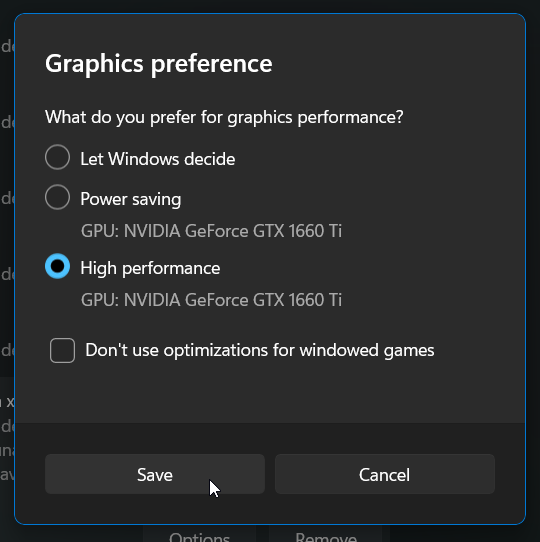
Step 4: Override automatic GPU selection
- After having returned to the main Settings window, click on "Zulu Platform x64 Architecture".
- Press the "Options" button.
- Select "High performance".
- Press the "Save" button.
More in General Issues
Lunar Client logos not appearing
Lunar Client logos next to names indicate that a user is currently playing on Lunar Client.
No Lunar Client shortcut
Lunar Client was not able to create a shortcut on your desktop or Start Menu folder, so the launcher will not appear in Windows Search.
Can't hear sound in game
If Lunar Client's sound is not functioning, please follow the steps below.
Lunar Client launcher is infinitely refreshing on start-up
If the Lunar Client launcher opens and infinitely refreshes, it's likely due to having package.json file in your user folder.
Multiplayer Access Disabled
External Software Interfering With Lunar Client
There are several symptoms which can be caused by external software interfering with Lunar Client. These includes
© 2026 Moonsworth, LLC